

Reliable transactional email infrastructure for modern applications. Send verification emails, password resets, notifications, invoices, onboarding emails, and system alerts with high deliverability and secure domain authentication. Antryk Email Services helps developers and businesses send production-ready emails without managing SMTP servers, deliverability issues, DNS complexity, or scaling infrastructure.Documentation Index
Fetch the complete documentation index at: https://docs.antryk.com/llms.txt
Use this file to discover all available pages before exploring further.
Email API Reference
Explore API endpoints, SDK usage, request formats, authentication, and integration examples.
Why Use Antryk Email Services?
Building and maintaining a reliable email infrastructure is complex. Antryk simplifies email delivery with managed authentication, scalable infrastructure, analytics, real-time tracking, and developer-friendly APIs.Benefits
- High Deliverability — Optimized infrastructure for inbox placement
- Secure Email Authentication — SPF, DKIM, and domain verification support
- Scalable Infrastructure — Send from a few emails to millions reliably
- Real-Time Tracking — Monitor deliveries, opens, clicks, and bounces
- Template Management — Reusable and dynamic email templates
- Webhook Events — Real-time delivery and engagement notifications
- Developer Friendly — Fast API integration with official SDK support
- Production Ready — Designed for SaaS, startups, eCommerce, and enterprise applications
- Advanced Dashboard — Manage domains, DNS records, logs, and analytics from a centralized interface
Common Use Cases
Antryk Email Services can power a wide range of transactional and business email workflows.Authentication Emails
- Email verification
- OTP and login codes
- Password reset emails
- Account recovery notifications
Product & SaaS Notifications
- User onboarding emails
- Feature announcements
- Billing notifications
- Subscription updates
- Usage alerts
eCommerce Emails
- Order confirmations
- Shipping notifications
- Invoice delivery
- Refund confirmations
Team & Collaboration
- Workspace invitations
- Team notifications
- Internal alerts
- Activity summaries
Marketing & Engagement
- Newsletters
- Product updates
- Campaign emails
- Re-engagement workflows
Getting Started
Set up your email infrastructure in minutes.Step 1 — Create an Email Service
Create and configure your email service directly from the dashboard.Step 2 — Verify Your Domain
Verify ownership of your sending domain using DNS records.Step 3 — Configure SPF & DKIM
Improve deliverability and protect your domain reputation with email authentication records.Step 4 — Send Test Emails
Validate DNS configuration and confirm successful delivery.Step 5 — Integrate with Your Application
Connect using the Email API or the official SDK.Official SDK on npm
Install the official Antryk SDK for Node.js applications and integrations.
Email Service Dashboard
Manage domains, monitor delivery performance, configure DNS records, and track email activity from a centralized dashboard. The Email Services dashboard is designed to simplify transactional email management for developers, startups, SaaS applications, and enterprise platforms.Dashboard Features
- Manage multiple verified domains
- Monitor email delivery statistics
- Configure SPF, DKIM, and DNS records
- Track transactional email logs
- Verify domains instantly
- Manage regional email infrastructure
- View sending performance and delivery metrics
- Centralized domain and email management
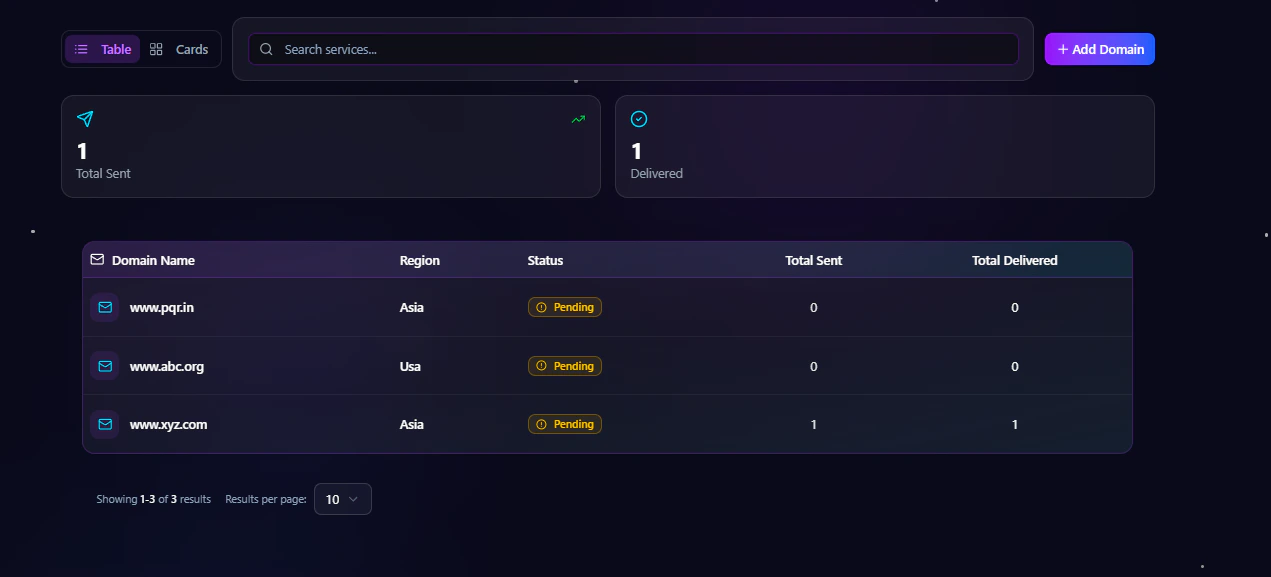
Domain Listing Page
The Email Services listing page gives you a complete overview of all configured email domains. You can quickly monitor:- Verified and pending domains
- Sending regions
- Total emails sent
- Total delivered emails
- Domain status and activity
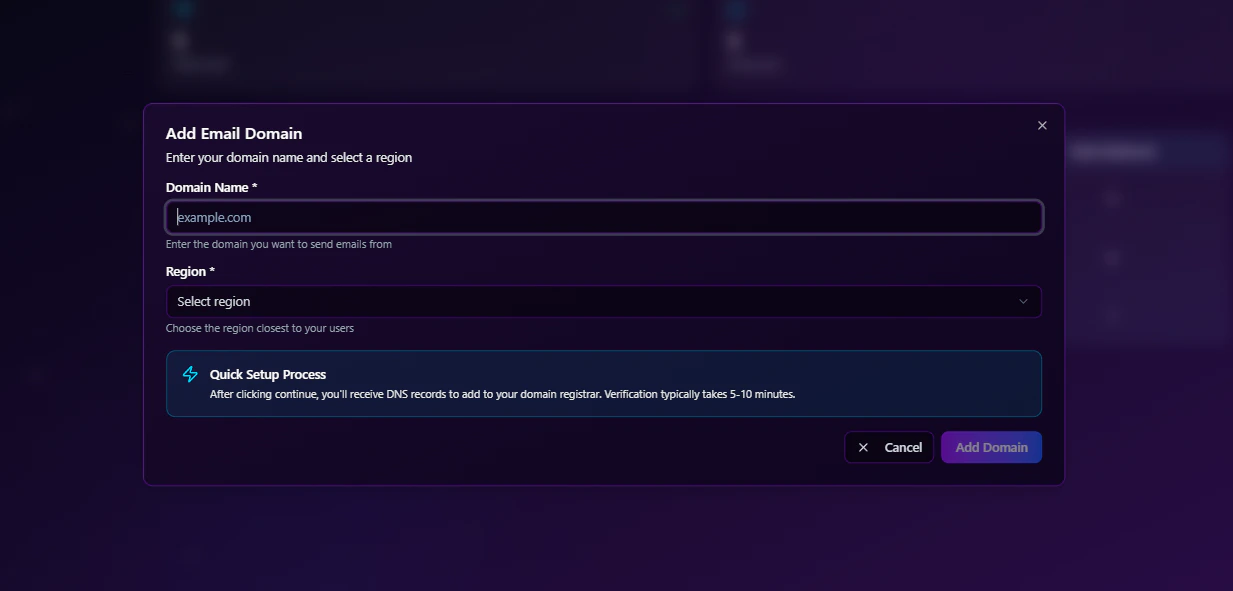
Add New Domain
You can add a new sending domain directly from the dashboard using the Add Domain action. The add domain dialog allows you to:- Enter your domain name
- Select the preferred sending region
- Create and configure the email service instantly
Email Service Detail Page
Each domain includes a dedicated detail page where you can manage configuration, monitor activity, and verify domain settings. The detail page contains multiple management tabs for complete email infrastructure control.Available Tabs
- Overview
- DNS Config
- Email Logs
- Settings
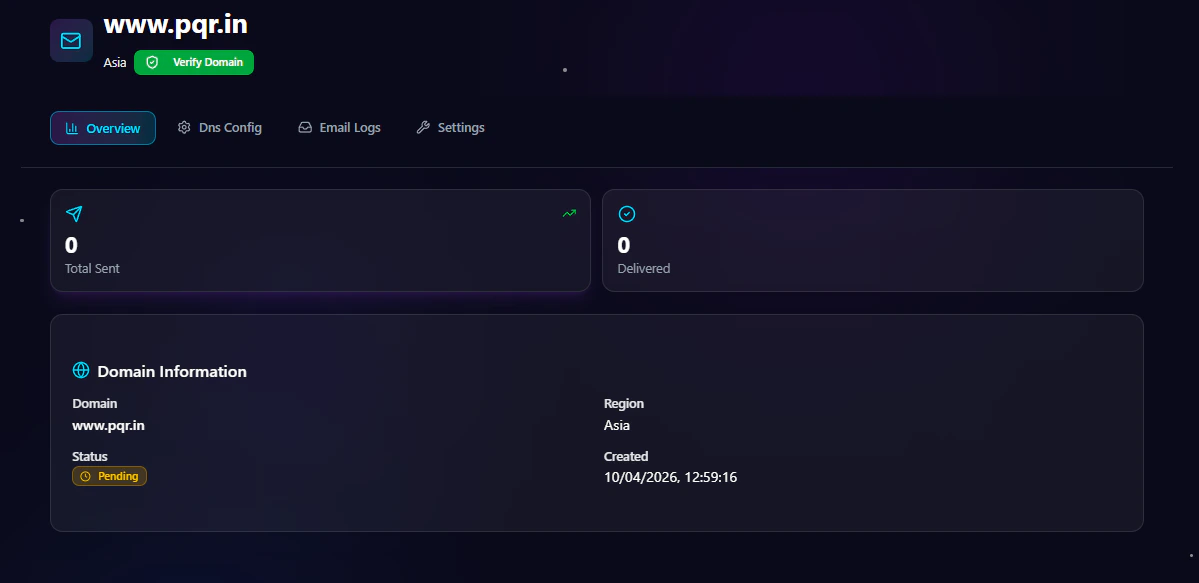
Overview Tab
The Overview tab provides high-level analytics and domain information for your email service.Overview Information
- Total emails sent
- Total delivered emails
- Domain name
- Domain status
- Region
- Created date
- Verification state
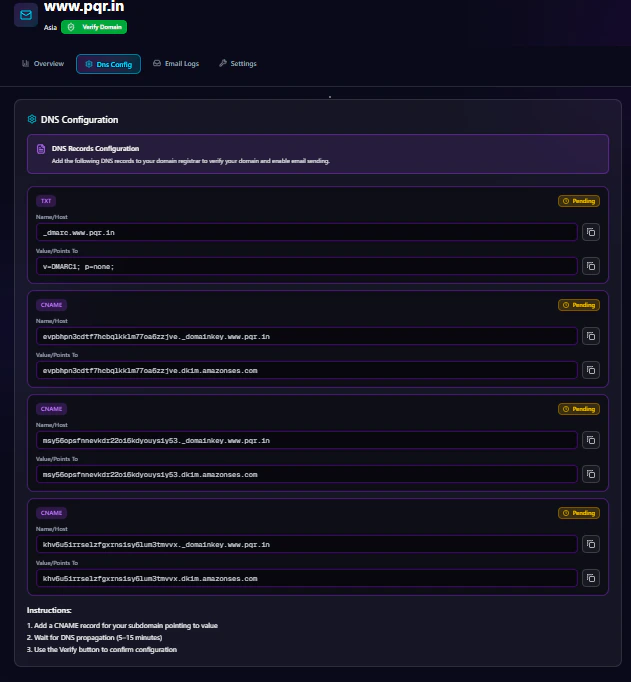
DNS Configuration Tab
The DNS Config tab helps you configure and verify your email authentication records. To activate email sending, you need to add the provided DNS records to your domain registrar.DNS Configuration Includes
- SPF records
- DKIM records
- Verification records
- Domain authentication setup
- Email deliverability
- Sender reputation
- Inbox placement
- Email security
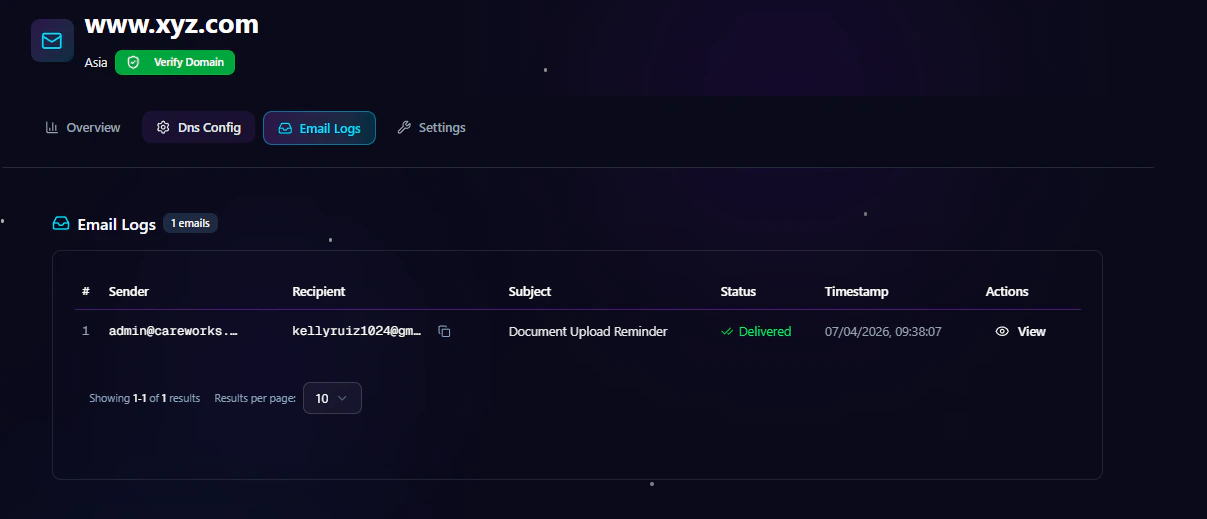
Email Logs Tab
The Email Logs tab provides detailed visibility into every email event generated from your application. You can monitor:- Sender email address
- Recipient email address
- Email subject
- Delivery status
- Timestamp
- Email actions and events
| Sender | Recipient | Subject | Status | Timestamp | Actions |
|---|
Settings Tab
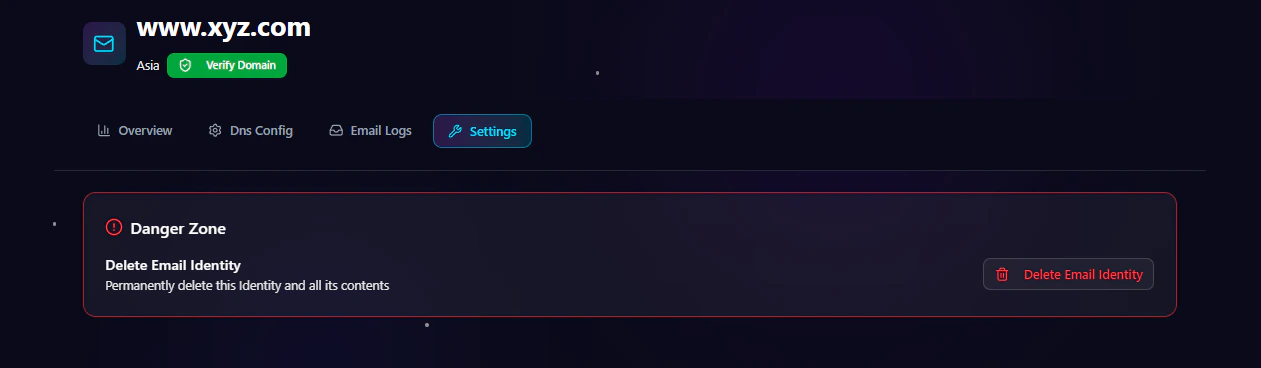
The Settings tab allows you to manage advanced domain actions and service controls.Available Settings
- Domain management
- Verification controls
- Service configuration
- Delete domain option
Domain Verification
Domain verification ensures that emails are sent securely and trusted by receiving mail providers.Why Domain Verification Matters
- Prevents email spoofing
- Improves inbox placement
- Protects sender reputation
- Enables authenticated sending
- Builds trust with email providers
Supported Authentication Standards
SPF (Sender Policy Framework)
SPF verifies which mail servers are allowed to send emails from your domain.DKIM (DomainKeys Identified Mail)
DKIM adds a cryptographic signature to outgoing emails to verify authenticity.DMARC Support
Strengthen domain protection and improve email trust policies.Email Deliverability
Deliverability is critical for transactional emails. Antryk Email Services is optimized to maximize successful inbox delivery rates.Deliverability Features
- Dedicated sending infrastructure
- Automatic retry handling
- Bounce management
- Reputation monitoring
- Spam prevention mechanisms
- Authentication best practices
- Email validation workflows
Email Templates
Create reusable and dynamic templates for consistent branding and faster development.Template Features
- Dynamic variables
- Reusable layouts
- Personalized content
- Multi-language support
- Transactional workflows
- Consistent branding
Real-Time Analytics
Track the performance and health of your email infrastructure with detailed analytics.Analytics Available
- Delivery rate
- Open rate
- Click-through rate
- Bounce tracking
- Spam complaint monitoring
- Engagement insights
- Device and client analytics
Webhooks & Event Notifications
Receive real-time updates whenever email events occur.Supported Events
- Email delivered
- Email opened
- Link clicked
- Email bounced
- Spam complaint
- Delivery failed
- Unsubscribe events
Security & Compliance
Security is built into the platform to protect your data and email reputation.Security Features
- Secure API authentication
- Domain verification
- DKIM signing
- SPF validation
- TLS email delivery
- Access control support
- Activity monitoring
Performance & Scalability
Designed for growing applications and high-volume workloads.Infrastructure Highlights
- Low-latency email delivery
- Horizontal scalability
- Queue-based processing
- Reliable retry systems
- High availability architecture
- Optimized sending pipelines
Best Practices for Transactional Emails
Improve deliverability and engagement with recommended practices.Recommended Practices
- Verify your sending domain
- Configure SPF, DKIM, and DMARC
- Use recognizable sender names
- Keep email content clean and relevant
- Monitor bounce and complaint rates
- Warm up new domains gradually
- Avoid spam-triggering language
- Maintain healthy email lists
SDK & Developer Integration
Integrate quickly using the official SDK and developer APIs.Email Integration & API Usage
Learn how to authenticate requests, send emails, configure templates, and handle webhooks.
Pricing
Email Services pricing is designed to scale with your usage.Pricing Includes
- Pay-as-you-send model
- Volume-based discounts
- No setup fees
- Free domain verification
- Scalable infrastructure access
Optimized for Modern Email Infrastructure
The Email Services dashboard is built for scalability, reliability, and operational visibility. Whether you’re managing a single domain or enterprise-scale transactional email infrastructure, the platform provides:- Simplified domain management
- Real-time monitoring
- Secure DNS authentication
- Delivery tracking
- Centralized email operations